Redragon K552 Mechanical Gaming Keyboard, 87-Key Compact, LED, Red Switches, Metal Frame (Black) Review (2026)
Updated September 14, 2026 · Research-based review
Our verdict
The Redragon K552 is an 87-key tenkeyless board with a metal frame, Outemu Red linear switches and a fixed 1.8 meter cable, a long-running budget pick with rainbow LED backlighting. It has no hot-swap sockets, wireless mode or software. Our score of 8.1 out of 10 reflects a solid, no-frills pick years after release.
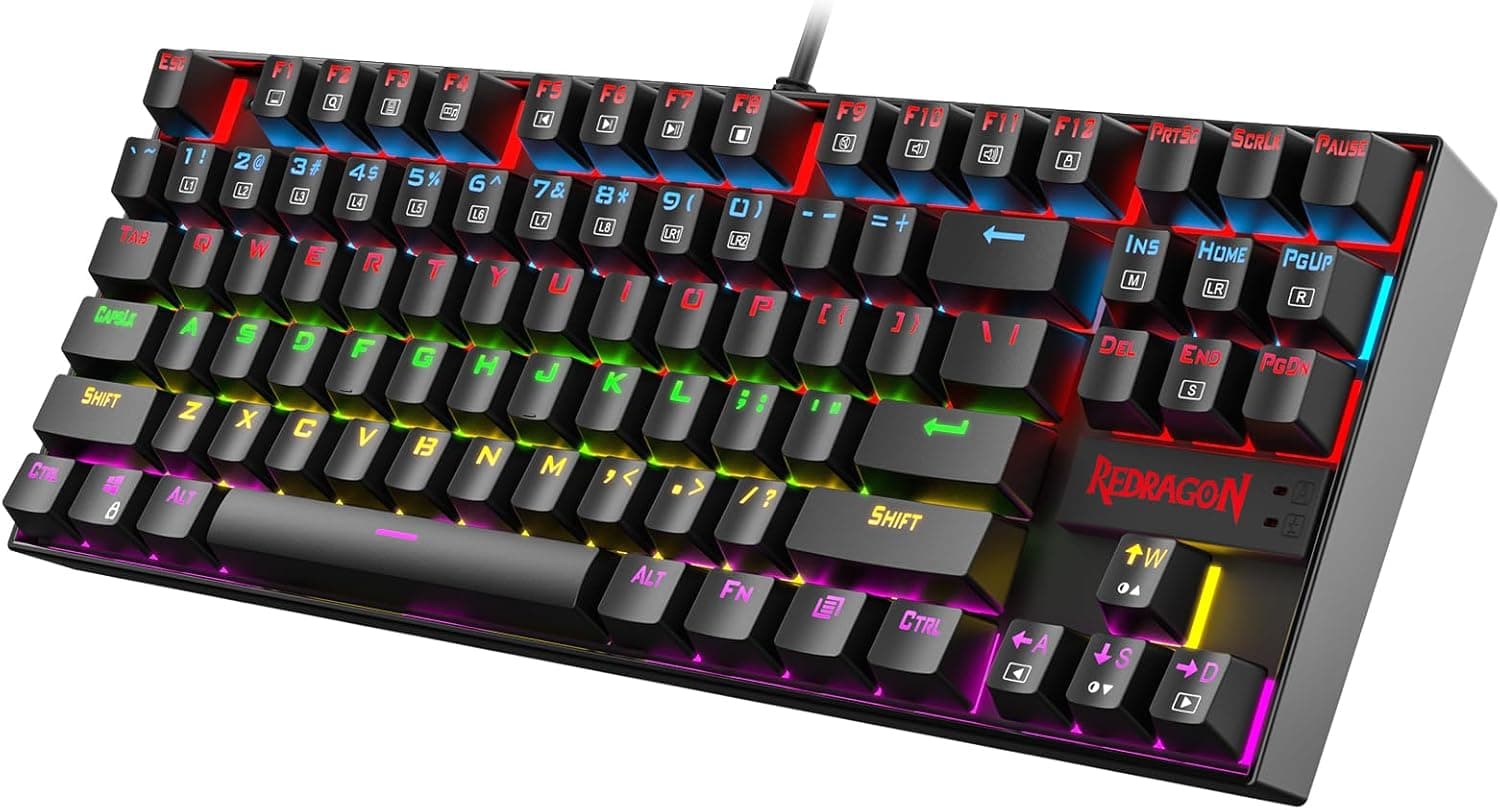
Redragon's K552 is a black 87-key compact board with red switches, LED lighting and a metal frame, a long-running budget favorite.
Price range: See on Amazon
What we liked
- + Metal frame adds stiffness that most boards in this price range lack
- + Long production run means plenty of user guides and spare keycaps
- + Red switches give smooth quiet keystrokes for gaming and typing
Trade-offs
- - Older design with no hot-swap, wireless or software extras
- - LED lighting is less flexible than full per-key RGB boards
Who the K552 is for
The K552 suits buyers who want their first mechanical keyboard without spending much, or anyone who wants a simple, reliable board for gaming and typing without wireless connectivity, software or hot-swap sockets to manage. Its metal frame gives it a sturdier feel than most keyboards at this price, which matters if the board will travel between a dorm room, an office desk or a LAN party bag. Because it has stayed in production for years, replacement keycaps, aftermarket cases and community troubleshooting guides are easier to find than for a newer, less common board. Buyers who specifically want to swap switches later, connect wirelessly, or use per-key RGB software should look elsewhere, since none of those features are part of this keyboard's design.
Switches, frame and what is actually inside
The K552 uses Outemu Red linear switches, a Cherry MX-style switch made by a different manufacturer, rated for roughly 50 million keystrokes with a light, smooth actuation around 45 grams of force. A black metal frame sits under and around the switches, adding rigidity that pure plastic-framed keyboards at similar prices often lack, and the frame also helps the board resist flexing during hard presses. The keyboard supports full anti-ghosting and N-key rollover across all 87 keys, meaning every key registers correctly even when many are pressed at once, a detail that matters more for gaming than everyday typing. There is no hot-swap socket, so changing switches later would require desoldering and soldering rather than a simple pull-and-replace process.
Cable, lighting and daily use
A fixed, non-detachable USB cable roughly 1.8 meters long connects the board, which means a damaged cable cannot be swapped out the way it could on a board with a removable USB-C connection. Rainbow LED backlighting runs across the keys with multiple lighting effects built in and accessible through key combinations, without needing separate software installed on the computer. The board weighs close to two pounds thanks to the metal frame, giving it a stable, non-slip feel on a desk during fast typing or gaming sessions. Because there is no wireless mode, the K552 is a wired-only keyboard, which some buyers will see as a plus for eliminating input lag and battery management, while others may find the permanent cable limiting for a multi-device setup.
How it compares with other budget mechanical boards
In the site's budget mechanical keyboards guide, the K552 ranks first out of seven, ahead of MageGee's MK-Box and SKY68 60 percent boards, which each score 7.1. Those MageGee boards trade the K552's tenkeyless layout and metal frame for a smaller 60 percent footprint and a plastic case, appealing to buyers who want the most compact desk footprint possible over build quality. Compared with the K552, the MageGee options also lack a metal frame, so they flex more under hard typing and generally feel less substantial. For buyers who specifically want the smallest possible keyboard and do not mind giving up the numpad-adjacent keys entirely, the MageGee boards are a reasonable step down in size and price, but the K552 remains the sturdier build.
Verdict and who should consider newer boards
Choose the K552 if you want an affordable, sturdy, no-frills mechanical keyboard for gaming or typing and do not need wireless connectivity, hot-swap sockets or companion software. Its metal frame and long production run make it a dependable choice with plenty of community support behind it, even though the design itself has not changed much since its release. Buyers who want to experiment with different switches over time should look at a newer hot-swappable board instead, since the K552's switches are soldered in place. Anyone who needs a wireless keyboard for a tidy multi-device setup should also look elsewhere, since this is a wired-only board. For a straightforward, budget-friendly mechanical keyboard with real metal in the frame, the K552 still earns its place at the top of the guide.
Frequently asked questions
Does the Redragon K552 support hot-swappable switches?
No, the switches are soldered to the PCB rather than hot-swappable, so replacing them requires desoldering rather than a simple pull-and-replace process.
What type of switches does the K552 use?
It uses Outemu Red linear switches, a Cherry MX-style switch with a light, smooth actuation and no tactile bump or click.
Is the Redragon K552 wireless?
No, it connects only through a fixed, non-detachable USB cable roughly 1.8 meters long. There is no Bluetooth or 2.4GHz wireless mode.
Does the K552 need software to change the lighting?
No, the rainbow LED backlighting effects are controlled through key combinations on the keyboard itself, without needing separate software installed.
Prices change often, so check the current price and availability on Amazon.
Check price on AmazonMechKeeb Lab may earn a commission from the link above.