Keychron K6 65% Compact 68 Keys Wireless Mechanical Keyboard Gateron Blue Review (2026)
Updated September 14, 2026 · Research-based review
Our verdict
The K6 packs a 68 key 65% layout with arrow keys into a wireless board that pairs with three devices over Bluetooth or plugs in over USB-C. Gateron Blue switches give a satisfying clicky feel for typists, though the compact layout drops the function row and the click can be loud around others.
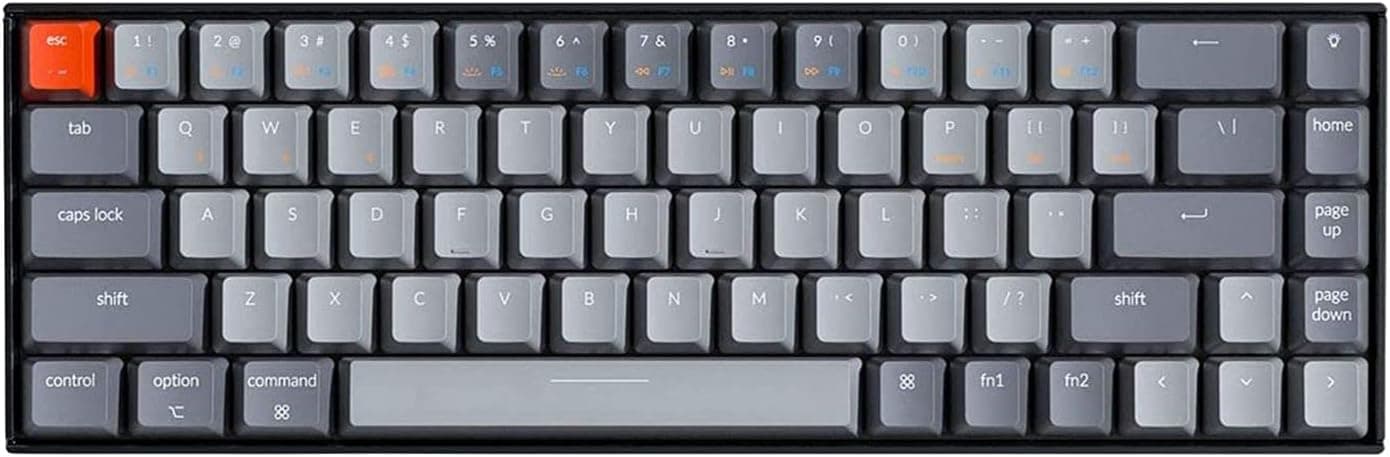
Keychron's K6 is a 68-key 65% compact wireless board with Gateron Blue switches, trading the F row for a smaller body.
Price range: See on Amazon
What we liked
- + 65% layout keeps arrow keys that many smaller compact boards remove
- + Gateron Blue switches give crisp clicky feedback for tactile typists
- + Wireless Bluetooth pairing handles several devices with quick switching
Trade-offs
- - No function row, so F keys need a layer combination
- - Clicky switches may be too loud for quiet workplaces
Who the K6 is built for
Keychron's K6 suits anyone who wants a smaller keyboard footprint without losing arrow keys entirely, a common complaint with even more compact 60% boards. The 65% layout keeps a dedicated arrow cluster and a narrow column of navigation keys while dropping the function row and number pad, which frees desk space for a mouse without forcing you onto a function layer for basic navigation. Writers and programmers who move between a desktop and laptop through the day benefit from Bluetooth pairing across up to three devices, switching between them without unplugging anything. Gamers focused purely on the fastest possible response time may prefer the wired mode or a board with a higher polling rate, since Bluetooth introduces a small amount of latency compared with a wired connection.
Specs and switch feel explained
The board houses 68 keys wired to Gateron Blue switches, a clicky switch type with a pronounced tactile bump followed by an audible click on every keystroke, the same character that made Cherry MX Blue popular. Connectivity runs through Bluetooth 5.1 for up to three paired devices or a USB-C cable for wired mode, and Keychron rates the switches for tens of millions of keystrokes over their lifespan. A large internal battery is rated for up to 240 hours of typing with the backlight off, dropping to somewhere around 72 hours with the RGB backlighting running constantly. Keycaps ship in sets for both Mac and Windows layouts, and the board supports full N key rollover when wired, with a reduced 6 key rollover over Bluetooth.
Daily use, setup and care
Setup is straightforward, pair over Bluetooth from the system menu or plug in the USB-C cable for a zero setup wired connection, and the board is ready to type on immediately. The inclined bottom frame with adjustable feet lets you set a comfortable typing angle without buying a separate wrist rest or stand. Because there is no dedicated function row, accessing F keys, media controls, and backlight settings all run through Fn key combinations, which takes a short adjustment period for anyone coming from a full size board. Care is mostly about managing the clicky switches around others, since the audible click carries in quiet rooms, and keeping the board dust free with compressed air protects the switch feel over time, as Keychron does not market this model as hot swappable.
How the K6 stacks up against rivals
The aluminum framed K6 variant with brown switches trades the clicky feedback here for a quieter tactile bump, worth considering for shared offices where the audible click would be disruptive. Royal Kludge's RK68 wireless board offers hot swappable sockets at a similar size, appealing to anyone who expects to experiment with different switches down the road, something this fixed switch K6 does not allow. Against generic 65% boards without a recognized brand behind them, the K6 benefits from Keychron's longer track record of firmware support and keycap compatibility, a meaningful factor if you plan to keep the board for years and want spare parts or accessories later.
Verdict
For someone who wants a compact wireless board that keeps arrow keys and pairs cleanly across a laptop and desktop, the K6 with Gateron Blue switches lines up well with our score of 7.8 out of 10, balancing solid features against a build that is good but not top tier for the category. Buyers in shared spaces who are sensitive to clicky switch noise should consider the brown switch version instead, and anyone who wants to swap switches down the line should look at a hot swappable rival like the Royal Kludge RK68. As a dependable everyday 65% board from an established brand, the K6 remains a safe, well supported pick.
Frequently asked questions
Does the Keychron K6 have a function row?
No, the 65% layout skips the dedicated function row, so F keys and media controls are accessed through Fn key combinations.
How many devices can the K6 connect to at once?
It pairs with up to three devices over Bluetooth 5.1 and can also connect with a single device over wired USB-C.
Are the switches on the K6 hot swappable?
This standard K6 model ships with fixed Gateron switches rather than hot swap sockets, so switches are not meant to be changed by the owner.
How long does the battery last?
Keychron rates the K6 for up to 240 hours of typing with the backlight off, or roughly 72 hours with static RGB lighting running.
Prices change often, so check the current price and availability on Amazon.
Check price on AmazonMechKeeb Lab may earn a commission from the link above.