Keychron K10 Full Size RGB Hot-Swappable Mechanical Keyboard, 104-Key, Bluetooth/USB Wired, Super Brown Review (2026)
Updated September 14, 2026 · Research-based review
Our verdict
The Keychron K10 pairs a full 104-key layout with a hot-swap socket and Super Brown switches, good for typists who want a numpad and room to try switches later. The plastic case will not match aluminum boards for density, but Bluetooth multi-device pairing helps daily use. Our score of 8.2 out of 10 places it ahead of rivals.
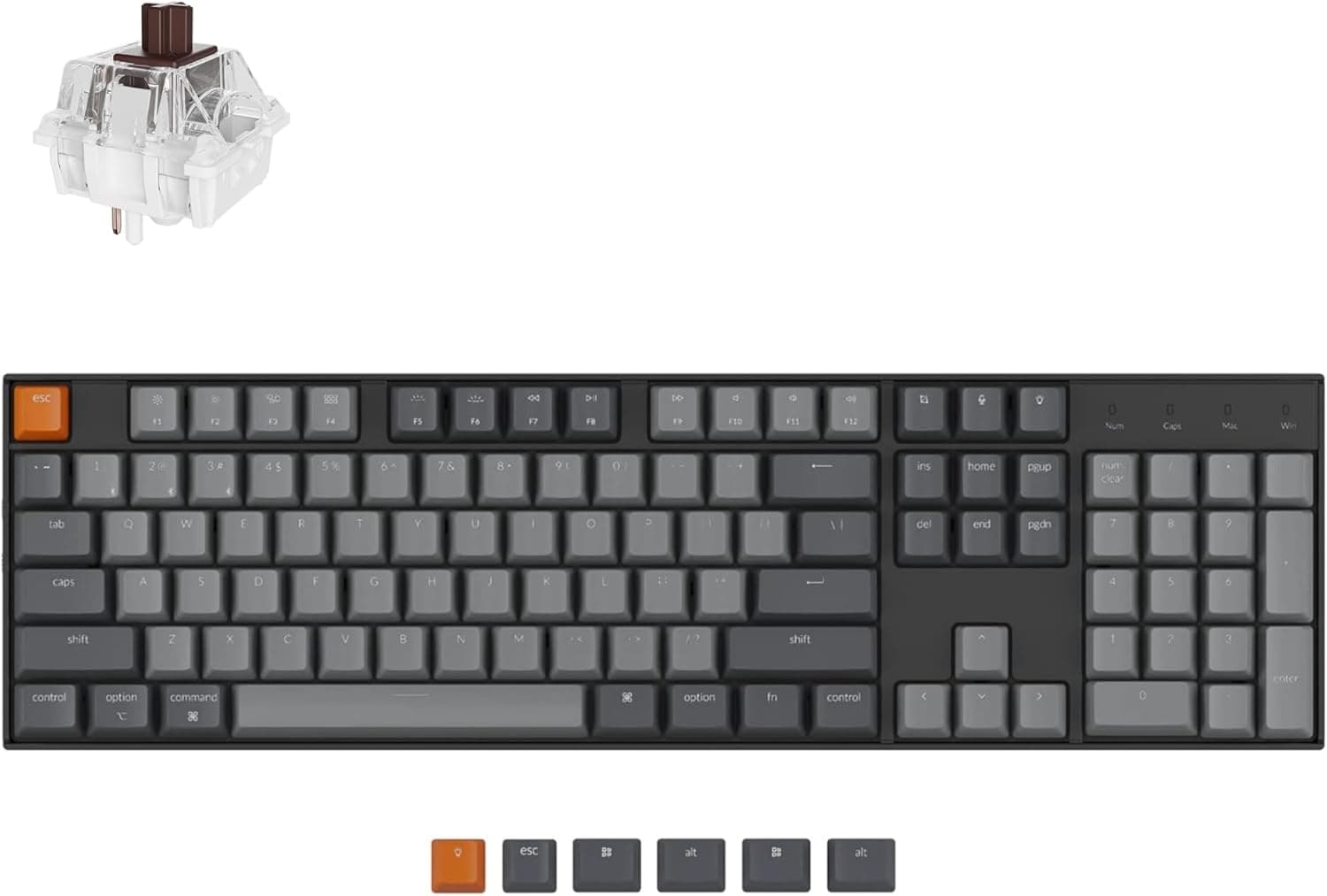
Keychron's K10 hot-swappable full size board has 104 keys, RGB, Bluetooth or USB wired modes and Super Brown switches.
Price range: See on Amazon
What we liked
- + Hot-swap sockets let you customize switches without losing the full numpad
- + Bluetooth and USB wired modes cover office PCs and home laptops
- + Super Brown switches give a pleasant tactile bump for heavy typing
Trade-offs
- - Large full size frame takes up a lot of desk width
- - Plastic case sounds less refined than aluminum hot-swap boards
Who the K10 fits best
The Keychron K10 is built for anyone who wants a complete 104-key layout with a working number pad and plans to swap switches down the line instead of buying a new board every time preferences change. Its hot-swappable printed circuit board accepts common MX-style 3-pin and 5-pin switches, so the pre-installed Keychron Super Brown tactile switches are a starting point rather than a permanent choice. Office workers who juggle a desktop and a laptop benefit from Bluetooth pairing across multiple devices alongside a USB-C wired mode for a steady connection when it matters most. Buyers chasing a dense, heavy sound signature or maximum case rigidity should look further up Keychron's aluminum-frame line instead. For most typists who want full-size ergonomics, RGB lighting and easy switch experimentation without a steep price, the K10 covers the basics well.
What the hot-swap socket and Super Brown switches feel like
Super Brown is Keychron's house tactile switch, giving a noticeable bump partway through each keystroke that helps typists confirm a press without bottoming out every key. Because the board uses a hot-swap socket rather than soldered switches, anyone can pull the Super Browns with a simple switch puller and drop in Cherry, Gateron or other MX-compatible switches without touching a soldering iron. This matters most once the stock switches start to feel worn or a buyer decides they prefer a linear or clicky feel instead. The 104-key full-size layout keeps the arrow cluster, function row and numpad in their familiar positions, which shortens the adjustment period for anyone moving from a standard office keyboard. RGB backlighting runs under every key, and per-key customization is available through Keychron's software on the wired connection.
Living with the K10 day to day
Daily use centers on the K10's Bluetooth 5.1 connection, which pairs with up to three devices and lets a single board serve a work laptop and a home desktop without repeated re-pairing. Switching profiles is handled through a physical toggle rather than a software hub, which keeps the process quick once the initial pairing is done. The USB-C wired mode removes any wireless latency for gaming or fast typing sessions and doubles as the charging path for the internal battery. Keycaps use Keychron's standard ABS double-shot set, which holds up to daily typing but will show shine faster than PBT caps on pricier boards. The full-size footprint takes noticeably more desk width than a tenkeyless or 75 percent layout, so desk space is worth checking before buying if a mouse needs extra room to the right.
Trade-offs and how it stacks up against RGB Kludge boards
The plastic case is the clearest trade-off here. It keeps weight down and cost reasonable, but it does not deliver the denser, more muted sound that aluminum-cased hot-swap boards produce, and some buyers will notice more hollow resonance on harder keystrokes. In the site's hot-swappable keyboards guide, the K10 ranks first out of seven, just ahead of RK ROYAL KLUDGE's RK68 and RK84 boards, which score close behind at 8.2. The RK68 trades the numpad for a compact 65 percent frame, a reasonable alternative for anyone who values desk space over a full-size layout. The RK84 boards add a triple-mode connection and a 75 percent layout with dedicated arrow keys but still skip the numpad, so buyers who specifically need number-pad access have fewer real alternatives at this size and price.
Verdict: who should buy it, who should look elsewhere
Choose the K10 if a full 104-key layout with a numpad, hot-swap flexibility and multi-device Bluetooth matter more than a premium aluminum chassis. It is a sensible pick for an office keyboard that can also follow a laptop between rooms or desks, and the ability to change switches later extends its useful life well past the stock Super Browns. Buyers who want the densest possible sound and sturdiest case should look at Keychron's aluminum-frame boards or the RK84 series instead, accepting the trade-off of a smaller layout. Anyone who never plans to swap switches may not need the hot-swap socket at all and could save money on a soldered board. For a flexible, numpad-equipped daily typer, the K10 earns its top spot in the guide.
Frequently asked questions
Can I replace the pre-installed Super Brown switches on the K10?
Yes, the K10 uses a hot-swap socket that accepts common MX-style 3-pin and 5-pin switches, so you can pull the stock Super Browns with a switch puller and install Cherry, Gateron or other compatible switches without soldering.
Does the Keychron K10 have a numpad?
Yes, it uses a full 104-key layout that includes a dedicated number pad, function row and arrow cluster in the standard full-size arrangement.
Is the K10 case made of aluminum or plastic?
This version uses a plastic case rather than an aluminum frame, which keeps weight and price down but gives a less dense sound than Keychron's aluminum-cased hot-swap boards.
How many devices can the K10 connect to over Bluetooth?
It pairs with up to three devices over Bluetooth 5.1 and switches between them with a physical toggle, in addition to a USB-C wired mode.
Prices change often, so check the current price and availability on Amazon.
Check price on AmazonMechKeeb Lab may earn a commission from the link above.