Logitech MX Mechanical Wireless Illuminated Keyboard Tactile - Graphite Review (2026)
Updated September 14, 2026 · Research-based review
Our verdict
The Logitech MX Mechanical is a graphite wireless board for people who type all day across multiple work devices and want tactile feedback without clicky noise. Its metal-backed low-profile build earns our score of 9/10, but hot-swap fans should look elsewhere since the switches are fixed.
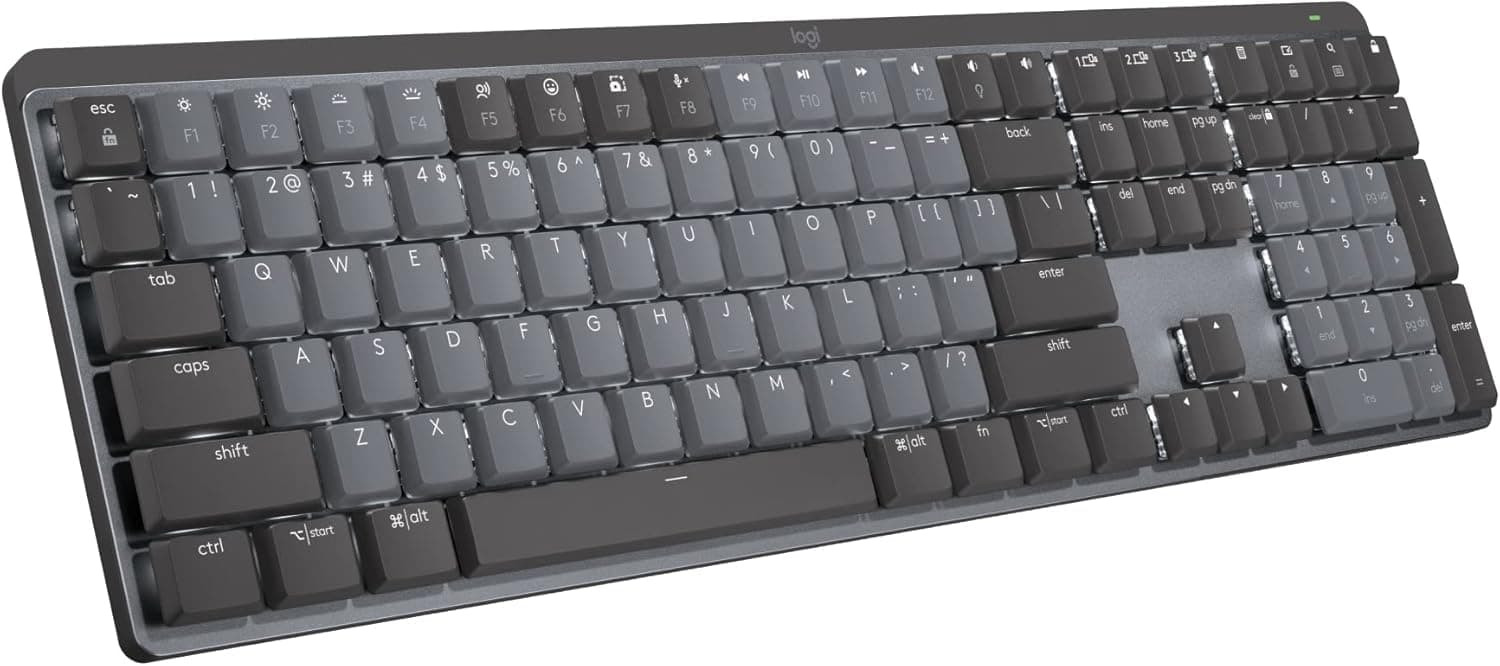
Logitech's MX Mechanical is a graphite wireless board with tactile switches and smart backlighting, built for office productivity.
Price range: See on Amazon
What we liked
- + Logitech wireless and multi-device pairing are reliable for switching between work laptops
- + Tactile switches offer gentle feedback without the noise of a clicky keyboard
- + Low-profile design and illuminated keys feel familiar to people moving from laptop keyboards
Trade-offs
- - Switches are not hot-swappable, so the typing feel is fixed for the life of the board
- - Low-profile keycaps limit aftermarket keycap choices compared with standard boards
Who the MX Mechanical is built for
This is Logitech's productivity focused mechanical keyboard, aimed at office workers and professionals who already use the MX Master mouse ecosystem and want a matching typing tool. The Tactile Quiet switches give a soft bump on each press without the sharp click of a gaming board, which fits open offices and video calls. Support for pairing up to three devices over Bluetooth or the included Logi Bolt receiver makes it a strong pick for anyone who moves between a work laptop, a personal machine, and a tablet during the day. It is less suited to people chasing a specific switch feel or sound, since the low-profile switches cannot be swapped for something else later.
Build, battery and illumination specs
The keyboard measures about 17.08 by 5.17 inches and weighs close to 29 ounces, built around a full-size low-profile layout with a metal top plate for rigidity. A built in battery is rated for up to 15 days of use with the backlighting on, stretching to roughly 10 months with backlighting off, and it recharges fully in about three hours over USB-C. Smart illumination senses when hands approach the keyboard and adjusts backlight brightness automatically to the surrounding light, then dims again when hands move away to save power. The bundled Logi Bolt USB receiver pairs alongside Bluetooth, giving a second reliable connection path for desktops without built in wireless.
Living with it across a multi-device workday
Switching between the three paired devices happens with a dedicated key combination, and Logitech's software lets each connection remember its own settings, which matters for anyone bouncing between a personal and a work computer during the day. The low-profile keys sit close to the desk, closer to a laptop keyboard than a tall mechanical board, so the adjustment period for switch typists is short. Because the switches are not hot-swappable, there is no maintenance step of lubing or replacing individual switches over time, which keeps upkeep simple but removes any option to change the feel later. Cleaning is limited to wiping the low-profile keycaps, which do not pop off as easily as taller standard keycaps.
Trade-offs against other wireless mechanical boards
Compared with the RK ROYAL KLUDGE R75, a gasket mount board with a volume knob and hot-swappable switches, the MX Mechanical gives up build customization in exchange for Logitech's software polish and longer battery life claims. Against the Keychron K2 75 percent, which offers RGB backlighting and a lower cost, the MX Mechanical leans harder into office-appropriate quiet operation and multi-device pairing rather than gaming features. The fixed low-profile switches are the clearest limitation versus nearly every rival in this category, since none of them can be swapped once the tactile feel starts to wear in. Buyers who want to experiment with switch types should treat this as a downside from day one, not something to work around later.
Verdict and who should choose differently
The MX Mechanical fits people who want a quiet, tactile keyboard that pairs reliably across a few devices and matches the rest of a Logitech desk setup, with battery life long enough to mostly ignore charging. It is a weaker choice for anyone who wants to try different switches over time, chase a louder or heavier typing feel, or save money with a simpler wired board. Buyers focused purely on cost per switch feel should compare it against hot-swappable rivals like the R75 before committing, since the low-profile format here cannot be changed once purchased.
Frequently asked questions
How long does the MX Mechanical battery last?
Logitech rates the built in battery for up to 15 days with backlighting on, or up to about 10 months with the backlight turned off, recharging fully in around three hours over USB-C.
Can the switches be swapped for a different feel?
No. The low-profile mechanical switches are fixed and not hot-swappable, so the typing feel stays the same for the life of the keyboard.
How many devices can it pair with at once?
Up to three devices can be connected simultaneously using Bluetooth or the included Logi Bolt USB receiver, with quick switching between them.
Is this keyboard quiet enough for open offices?
The Tactile Quiet switches are designed to give feedback without a loud click, making it noticeably quieter than clicky mechanical boards, though it will still sound different from a membrane keyboard.
Prices change often, so check the current price and availability on Amazon.
Check price on AmazonMechKeeb Lab may earn a commission from the link above.