KINESIS Advantage360 Professional Split Ergonomic Keyboard Bluetooth Contoured Review (2026)
Updated September 14, 2026 · Research-based review
Our verdict
The Advantage360 Professional is a flagship split ergonomic board for people dealing with wrist, shoulder or forearm strain who need real contoured key wells and adjustable tenting. It commands a premium price and takes real practice to master, but the ZMK firmware and 3-year warranty back up its serious ergonomic claims.
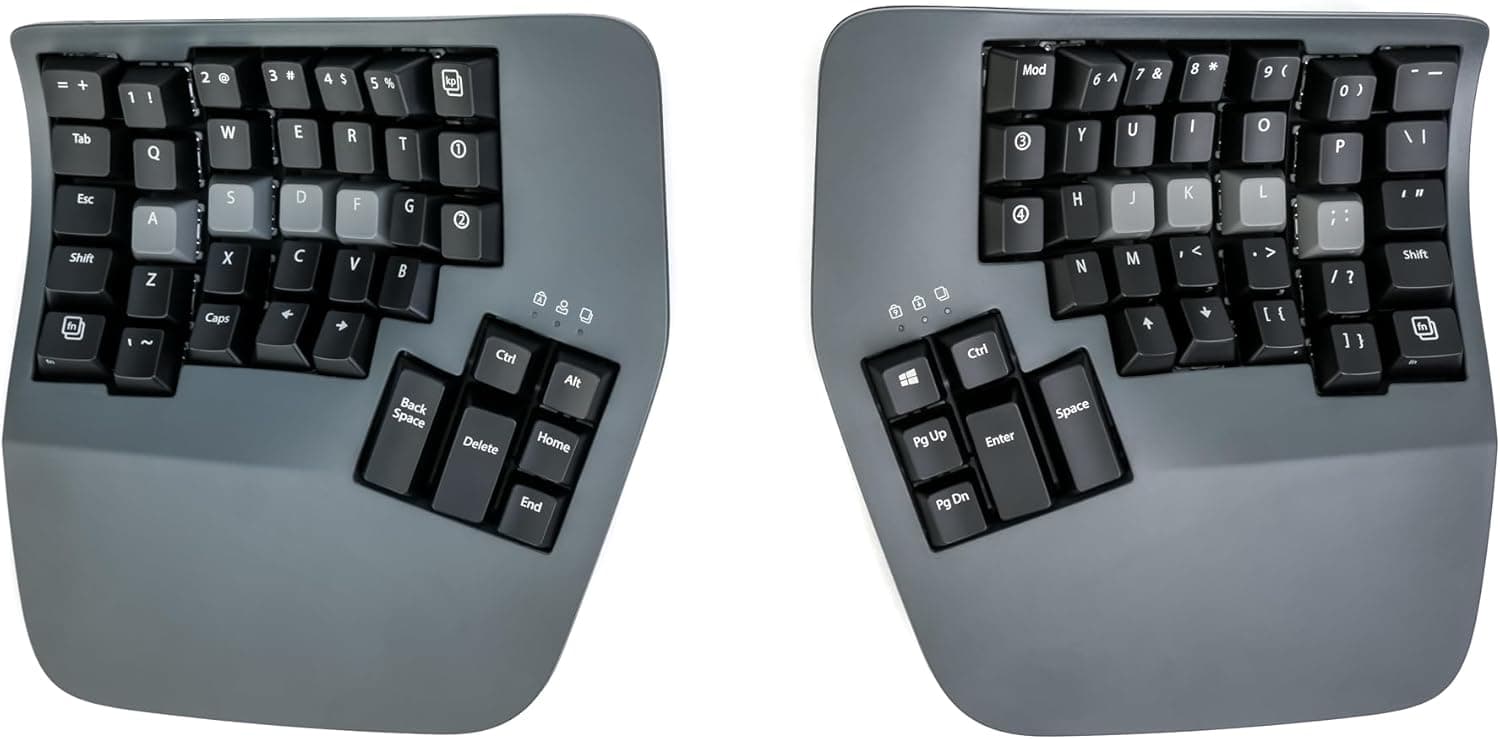
Kinesis Advantage360 Professional is a contoured split ergonomic Bluetooth board, a flagship for serious wrist and shoulder comfort.
Price range: See on Amazon
What we liked
- + Contoured key wells bring keys closer to fingers and reduce stretching
- + Split, adjustable halves let you set width and tenting for your posture
- + Kinesis has a long track record in ergonomic keyboards
Trade-offs
- - Very high price compared with flat split boards
- - Contoured layout needs weeks of practice before typing feels natural
Who needs a fully split, contoured board
The Advantage360 Professional is built for people already experiencing or actively trying to prevent wrist, forearm or shoulder discomfort from long hours at a keyboard, not casual shoppers looking for a novelty split layout. Kinesis has built ergonomic keyboards for decades, and this model applies that experience to a fully split, contoured design where the two halves separate completely and can be rotated and tented independently. That flexibility matters most for people with wide shoulders, existing repetitive strain injuries, or anyone whose desk setup does not allow a standard side-by-side keyboard to sit at a natural shoulder width. Programmers, writers and anyone typing for most of the workday are the clearest audience, since the contoured key wells and adjustable positioning are aimed squarely at reducing strain over thousands of keystrokes per day rather than adding gaming features.
The contoured design, switches and firmware
Each half of the Advantage360 weighs in at roughly 3 pounds 4.5 ounces combined and measures about 7.5 inches wide, 8 inches deep, with height adjusting from 2.75 to 4 inches for tenting. The keywells are concave, curving key positions toward the natural reach of the fingers instead of laying them flat, and the halves include integrated palm supports and dedicated thumb clusters that take on some of the keys a flat board would assign to weaker fingers. Buyers choose between Gateron Brown tactile switches at 45 grams of actuation force or Kailh Box Pink linear switches at 35 grams for a lighter, quieter press, both under shine-through ABS keycaps that support the optional white backlighting. The Professional model runs on open source ZMK firmware with Kinesis's browser-based Clique programming tool, giving access to up to 8 programmable layers and more than 350 possible key actions for deep customization.
Connecting it and living with the learning curve
Connectivity covers both a 6 foot braided USB-C cable for wired use and Bluetooth 5.0 Low Energy with roughly 30 feet of range and the ability to pair up to 5 devices, switching between a work laptop and a personal computer without re-pairing each time. A 1500mAh rechargeable battery is rated for an estimated 3-year lifespan and runs 2 to 3 weeks on a charge with backlighting on, stretching to 2 to 3 months with the lighting off. Because the layout is so different from a standard keyboard, with contoured wells, split halves and heavy reliance on thumb clusters for keys usually handled by other fingers, new owners should expect a genuine adjustment period measured in weeks rather than days before typing speed returns to normal. Kinesis backs the board with a 3-year limited warranty and offers a 60-day trial period, both useful given the investment required to commit to relearning a keyboard layout.
How it compares with other split ergonomic boards
Against the Keychron Q11 Ultra, a wireless split ergonomic board with dual knobs and a banana switch option that scores slightly higher in this guide, the Kinesis leans harder into true contoured key wells rather than a flatter split layout, which is a bigger ergonomic commitment but also a bigger adjustment. The Keychron Q11 QMK/VIA version offers hot-swappable hardware for switch experimentation that the Kinesis does not match in the same way, while the Kinesis counters with decades of dedicated ergonomic keyboard design and its open ZMK firmware. Against more affordable split boards like the YIVU Corne V4.1 or the NocFree wireless split keyboard, both of which sit lower in this guide's ranking, the Advantage360 Professional's contoured wells, integrated palm rests and established brand support justify a higher price for anyone whose main concern is genuine ergonomic support rather than a lower cost of entry into split typing.
Verdict and who should consider a flatter split board
Choose the Advantage360 Professional if wrist and shoulder comfort is the priority and the budget supports a premium ergonomic keyboard, since it earns our score of 9.0 out of 10 largely on how well it fits that specific job, backed by strong features and build quality. The 3-year warranty and 60-day trial help offset the risk of committing to such a different typing layout. Anyone unsure about tolerating a genuine learning curve, or working with a tighter budget, may prefer a flatter split board like the YIVU Corne V4.1 that still separates the halves without the full contoured well commitment. Gamers looking mainly for switch-swapping flexibility should also weigh the hot-swappable Keychron Q11 QMK/VIA against the fixed switch choices offered here.
Frequently asked questions
What switch options does the Advantage360 Professional offer?
Buyers choose between Gateron Brown tactile switches at 45 grams or Kailh Box Pink linear switches at 35 grams.
Can it connect to more than one device?
Yes, its Bluetooth 5.0 Low Energy connection supports pairing up to 5 devices and switching between them.
How long does the battery last?
The 1500mAh battery runs about 2 to 3 weeks per charge with backlighting on, or 2 to 3 months with it off.
Does it take long to get used to the layout?
Yes, the contoured wells and heavy thumb-cluster use are a significant change from a standard keyboard, so expect a genuine adjustment period of several weeks. For any repetitive strain concerns, follow a physician's guidance rather than relying on a keyboard alone.
Prices change often, so check the current price and availability on Amazon.
Check price on AmazonMechKeeb Lab may earn a commission from the link above.