AULA F75 Pro Wireless 75% Hot Swappable Custom Keyboard with Knob Review (2026)
Updated September 21, 2026 · Research-based review
Our verdict
The AULA F75 Pro pairs a gasket-mounted 75 percent layout with a control knob and tri-mode wireless, aimed at buyers who want a custom-feeling hot-swap board without building one from scratch. The knob and battery life stand out; check which switch variant you are ordering before buying.
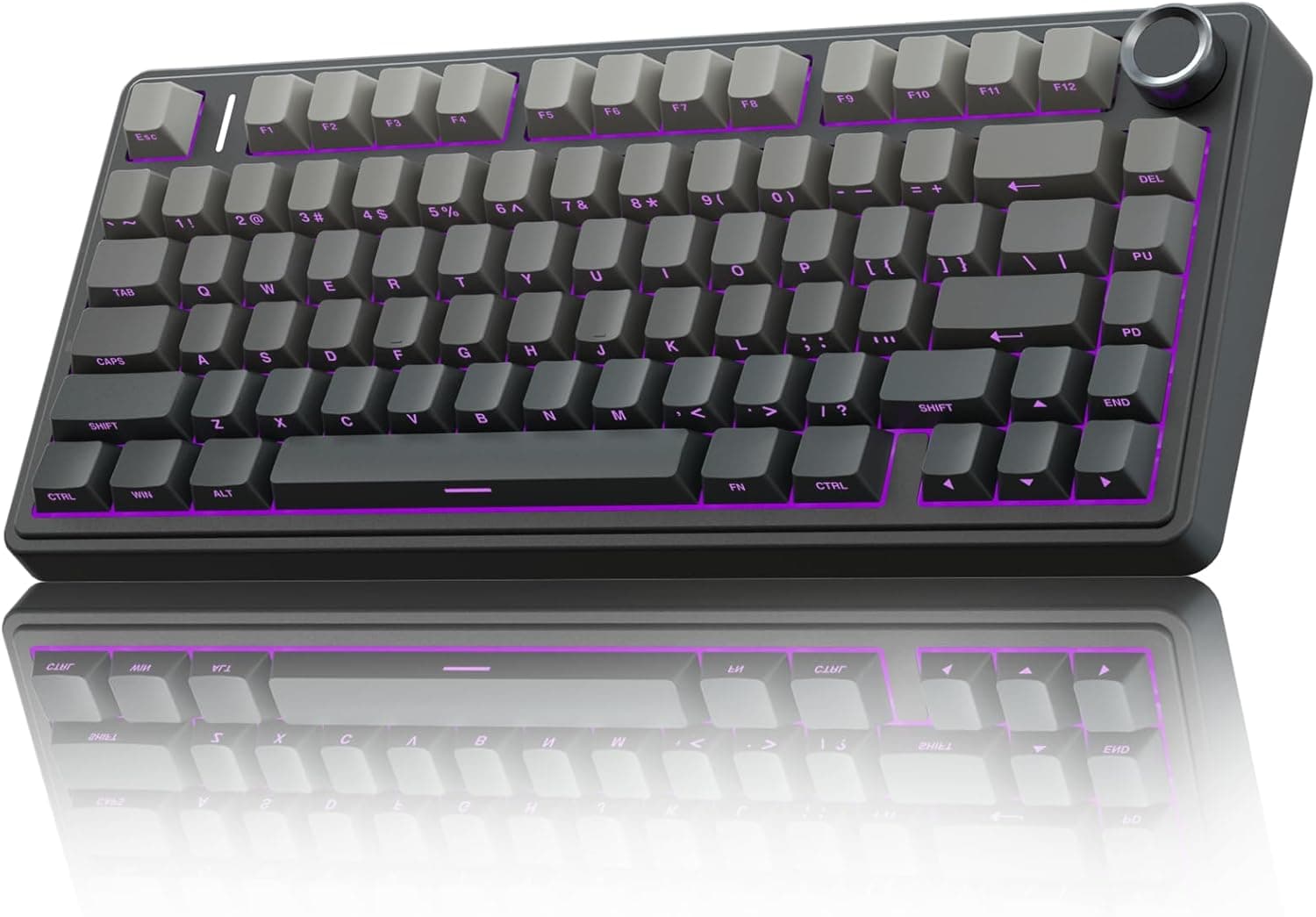
The Aula F75 Pro adds a knob to the wireless 75% hot-swap custom board, giving quick media control on a gasket style design.
Price range: See on Amazon
What we liked
- + Knob makes volume and media adjustments fast while gaming or working
- + Custom style build with hot-swap sockets invites switch and keycap upgrades
- + Wireless 75% layout keeps the desk tidy while retaining arrows and F keys
Trade-offs
- - Check which switch type variant you are ordering before buying
- - Knob adds height on the top right corner that some compact bags do not fit well
Layout and connection options
The F75 Pro uses a 75 percent layout with 81 keys, which keeps the function row and arrow keys while trimming the navigation cluster and numpad found on a full-size board, a popular middle ground between compact and full-featured. AULA's own product page lists tri-mode connectivity across 2.4GHz wireless, Bluetooth 5.0, and wired USB-C, and describes the keyboard as able to pair with multiple devices so you can switch between a desktop and a laptop without re-pairing each time. For competitive use, the 2.4GHz mode is the one to pick, since it carries the lowest input lag of the three; Bluetooth trades a bit of latency for convenience when you do not want a USB dongle taking up a port.
The knob and typing feel
The standout feature here is the multifunction metal control knob in the top right corner, which AULA's listing describes as adjusting backlight brightness and switching lighting effects when the board is in gaming mode, and controlling volume with play and pause on a click when the board is in office mode. That gives quick access to media controls without hunting for a function-layer shortcut, which is genuinely useful for anyone who listens to music or takes calls at their desk. The board uses a gasket mount design with five layers of sound dampening foam described on AULA's product page, which is meant to soften the bottom-out feel and reduce hollow case ping compared with a plate-mounted design screwed directly into the case.
Hot-swap sockets and switch options
AULA lists hot-swappable 3-pin and 5-pin sockets on the F75 Pro, so both standard and PCB-stabilized switches can go in without soldering, and the board ships with a factory switch already installed, sold in variants like Reaper, Star, or Graywood depending on the listing you choose. This particular listing does not name the pre-installed switch in its title, so it is worth checking the variant selector or product images before ordering if you have a specific switch feel in mind, since AULA sells the same F75 Pro chassis with several different factory switches. South-facing RGB with 16 lighting effects is included regardless of switch choice, and south-facing LEDs generally shine through keycap legends more evenly than north-facing designs.
Battery life and build
An independent review of the F75 Pro measured the keyboard at around 800 grams, which it called substantial for a 75 percent board, and found the case built from matte-finish plastic reinforced with an internal metal plate for added rigidity rather than a full aluminum shell. The same review reported a 4000mAh battery capable of roughly three weeks of daily use with RGB lighting off, dropping to about a week with RGB running at medium brightness, and it measured a 1000Hz polling rate over the 2.4GHz connection with no detectable added latency compared to a wired keyboard in that test. Those battery figures line up with what you would expect from a board in this size and price bracket.
Who this keyboard fits
The F75 Pro is aimed at people who want a custom, gasket-mounted typing feel and a media knob without assembling a keyboard from separate parts, and who will actually use the tri-mode wireless across more than one device. Gamers who care about the lowest possible latency should stick to the 2.4GHz mode rather than Bluetooth. Buyers focused purely on portability should note the roughly 800 gram weight and factor in a knob that adds a bit of height to the top right corner, which can matter for slim keyboard bags. Anyone with a strong preference for a specific switch feel should confirm the exact switch variant in this listing before checkout.
Frequently asked questions
Does the AULA F75 Pro work wired and wireless?
Yes, it supports tri-mode connectivity: 2.4GHz wireless, Bluetooth 5.0, and wired USB-C, and can pair with multiple devices.
What does the knob do?
In office mode it controls volume with play and pause on a click, and in gaming mode it adjusts RGB brightness and switches lighting effects, according to AULA's own product page.
How long does the battery last?
An independent review measured around three weeks of daily use with RGB off and about a week with RGB at medium brightness, on the keyboard's 4000mAh battery.
Can I put my own switches in it?
Yes, the board has hot-swap sockets that accept both 3-pin and 5-pin switches, so you can remove the factory-installed switches without soldering.
Prices change often, so check the current price and availability on Amazon.
Check price on AmazonMechKeeb Lab may earn a commission from the link above.