RK ROYAL KLUDGE RK61 60% Mechanical Keyboard Wireless Hot Swappable Red (White) Review (2026)
Updated September 14, 2026 · Research-based review
Our verdict
The Royal Kludge RK61 packs a 61-key 60 percent layout, hot-swap sockets, and triple-mode wireless into a white case with red linear switches at an entry-level price. It skips arrows and a function row entirely, so shortcuts lean on layer combinations you need to learn first.
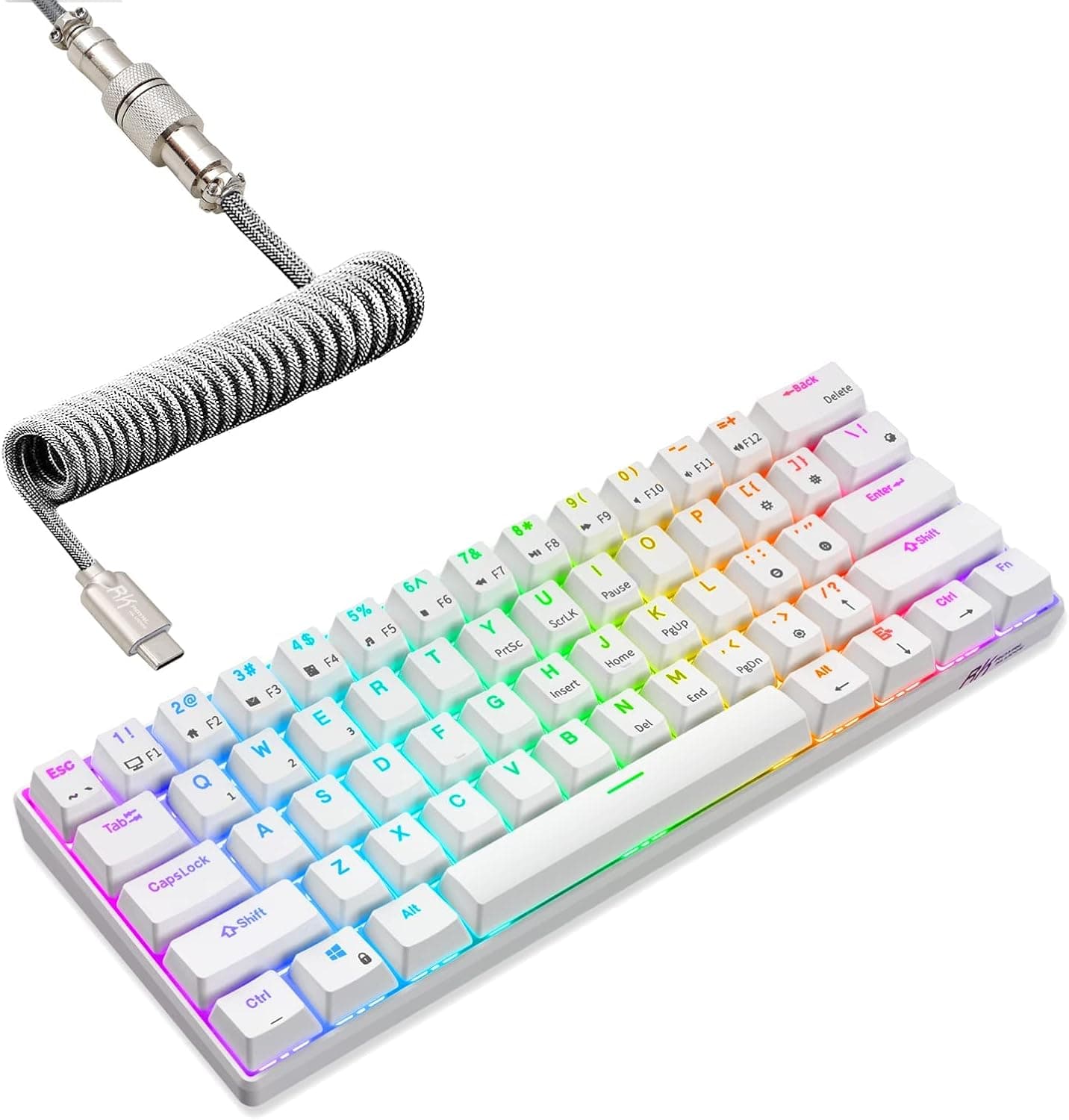
The RK Royal Kludge RK61 is a white 60% wireless board with hot-swap sockets and red switches, a cheap entry into compact typing.
Price range: See on Amazon
What we liked
- + Hot-swappable sockets let you try new switches later without soldering anything
- + Red linear switches stay quiet and light, which suits long typing and gaming sessions
- + Wireless 60% layout frees a lot of desk space for a mouse or a small notebook
Trade-offs
- - No arrow cluster or function row, so shortcuts rely on layer combos you must learn
- - Budget plastic case and stock stabilizers sound hollower than pricier compact boards
Who the RK61 is aimed at
The RK61 targets buyers who want to try a compact wireless mechanical keyboard without spending much, whether that is for a minimalist desk setup, a travel keyboard, or a first mechanical board to test the format. Triple connectivity, Bluetooth, a 2.4GHz dongle, and wired USB-C, according to the product listing, means it adapts to a laptop, a desktop, or a tablet without needing a different cable or dongle for each. Red linear switches keep the board relatively quiet and light under the fingers, which suits both long typing sessions and gaming where you want minimal resistance on each keypress. Anyone who relies on dedicated arrow keys or a function row for daily work should think carefully, since neither exists on this 60 percent layout without pressing a layer key first.
Layout, switches, and hot-swap sockets explained
This is a 60 percent board with 61 keys, a layout that removes the function row, arrow cluster, and numpad entirely to keep the footprint as small as possible, based on the product listing. The hot-swap PCB accepts both 3-pin and 5-pin switches, according to Royal Kludge's specifications for the RK61 line, which means you are not locked into red switches forever and can try tactile or other linear options later without soldering. Keycaps are double-shot PBT in a Cherry profile, a combination chosen for durability and legend clarity over long-term use. The white case with red switches gives a clean, visible contrast look, and the board includes RGB backlighting with adjustable effects through the bottom function layer.
Setting up wireless mode and daily use
Pairing over Bluetooth or the included 2.4GHz dongle is a standard process, holding a key combination to enter pairing mode, and the board also works wired over USB-C when you want a stable, lag-free connection or need to charge while typing. Because there is no arrow cluster or function row printed on the board, every shortcut that would normally use those keys needs a layer combination instead, which takes practice to memorize before it becomes automatic. Royal Kludge documents factory-lubricated stabilizers and sound-dampening foam inside the case on the RK61 line, aimed at reducing the hollow, tinny sound cheaper compact boards are known for. Day-to-day care follows standard hot-swap practice: dust with a soft brush, and pull switches gently with a proper tool if you decide to test a different feel.
Comparing the RK61 against other 60 and wireless boards
In the site's wireless roundup this RK61 ranks fourth of seven, behind the RK ROYAL KLUDGE R75, which adds a function row, a volume knob, and a gasket mount for a softer typing feel at a higher key count. Against the Keychron K2, also on the wireless list, the RK61 gives up the function row and arrow keys entirely in exchange for a noticeably smaller footprint. In the dedicated 60 percent roundup, the RK61 sits third of seven, behind the HK Gaming GK61 v3, which uses faster Speed Yellow switches for gaming, and just ahead of a brown-switch RK61 variant that offers a more tactile feel for the same compact layout. The recurring trade-off across every 60 percent board, including this one, is the same: smaller size always means giving up dedicated keys that some workflows depend on.
Verdict and who should choose a bigger board
Choose the RK61 if a small, wireless, budget-friendly mechanical keyboard appeals to you and you are willing to learn layer shortcuts for the arrow keys and function row this layout leaves off. Given our score of 7.9 out of 10, it earns strong marks for value and hot-swap flexibility, which lets you upgrade the switch feel later without buying a new board. Anyone who relies heavily on dedicated arrow keys, F-row shortcuts, or a numpad for spreadsheets and coding should look at a 75 percent or full-size board instead, since retraining those habits onto layers is the single biggest adjustment this keyboard demands. Gamers who want the fastest possible actuation may also prefer a Speed switch variant over the stock red linear switches here.
Frequently asked questions
Does the RK61 have arrow keys?
No, this is a 60 percent layout with 61 keys, so arrow keys, the function row, and the numpad are all left off to save space.
Can I change the switches on the RK61 later?
Yes, the hot-swap PCB accepts both 3-pin and 5-pin switches, so you can replace the stock red switches without soldering.
How does the RK61 connect to a computer?
It supports triple-mode connectivity: Bluetooth, a 2.4GHz wireless dongle, and a wired USB-C connection.
What keycap material does the RK61 use?
It ships with double-shot PBT keycaps in a Cherry profile, chosen for durability and clear legends over time.
Prices change often, so check the current price and availability on Amazon.
Check price on AmazonMechKeeb Lab may earn a commission from the link above.