Keychron K2 75% RGB Bluetooth Wireless Mechanical Keyboard, Super Brown Switch, 84 Keys Review (2026)
Updated September 14, 2026 · Research-based review
Our verdict
The Keychron K2 packs 84 keys into a 75 percent layout with tactile Super Brown switches and long Bluetooth battery life, a dependable pick for anyone splitting time between Mac and Windows. Its tall case usually needs a wrist rest, and this version cannot be upgraded with new switches later.
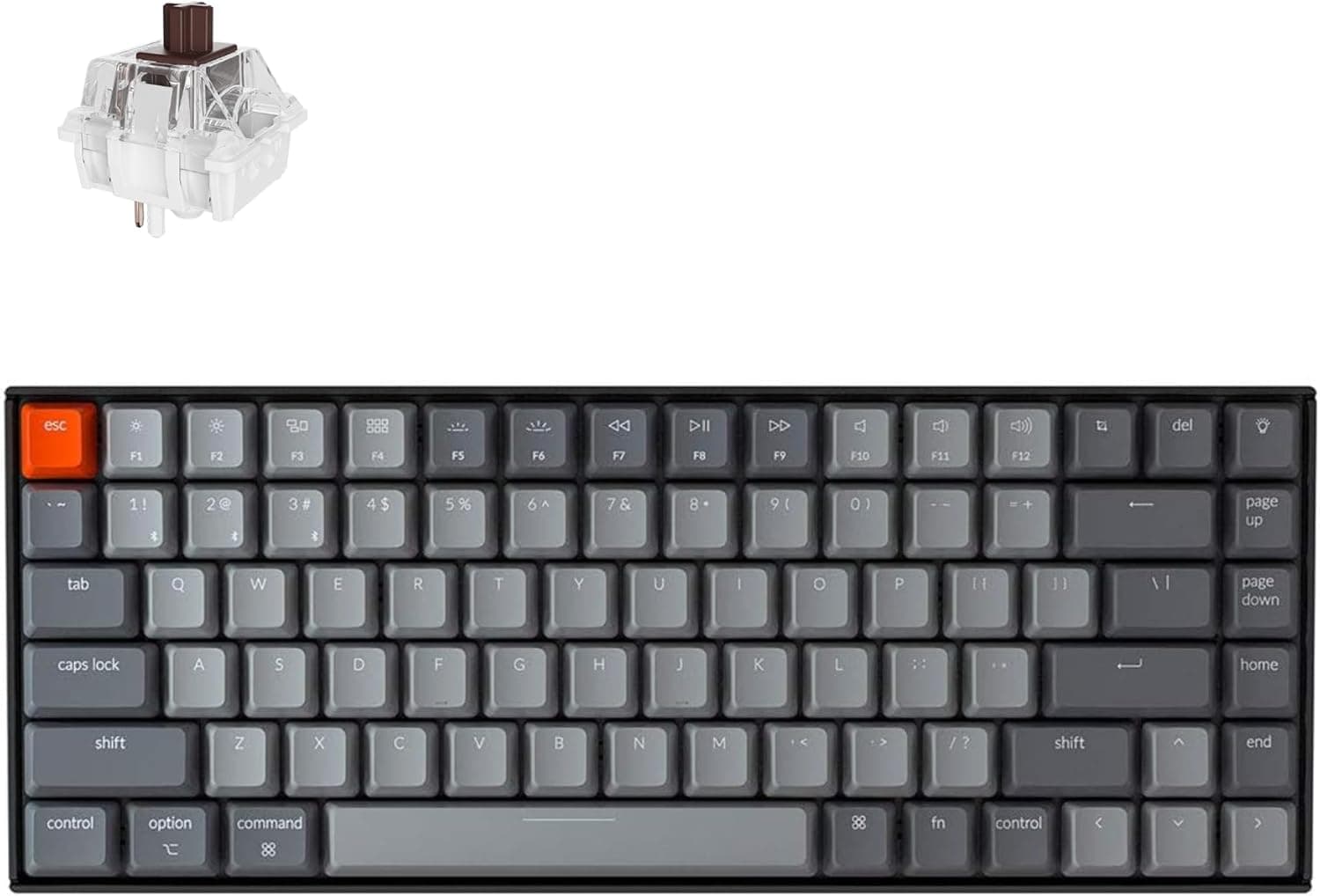
The Keychron K2 is an 84-key 75% Bluetooth board with RGB and Super Brown switches, a proven pick for Mac and Windows users.
Price range: See on Amazon
What we liked
- + 75% layout keeps arrows and a function row while trimming the numpad for a smaller footprint
- + Super Brown tactile switches give soft feedback that suits all-day typing
- + Keychron includes Mac and Windows keycaps, so switching systems feels natural
Trade-offs
- - Tall case height usually needs a wrist rest for comfortable long sessions
- - Standard switches are soldered in place, so changing them means desoldering
Who the K2 is built for
The K2 suits people who want a smaller keyboard than full-size but are not ready to give up the function row or arrow keys, since the 75 percent layout keeps both while trimming the numpad. Keychron ships this model with keycap sets for both Mac and Windows, so it fits anyone who regularly switches between the two operating systems without buying separate hardware. Bluetooth 5.1 pairing with up to three devices makes it easy to jump between a laptop, a tablet, and a desktop through the day. Anyone who wants the option to try different switches down the line, or who prefers a low-profile case that skips a wrist rest, should look at a different Keychron model instead.
Switches, battery, and keycap details
This version uses Keychron's own Super Brown tactile switch, which gives a soft bump partway through each keypress rather than the smooth travel of a linear switch, based on Keychron's specifications for the K2 line. The keycaps are double-shot PBT in a Cherry profile, a wear-resistant plastic and shape combination that keeps legends legible for years. Battery capacity sits at 4000mAh, rated for up to 72 hours of continuous typing or roughly a week of normal use at eight hours a day before a recharge is needed. RGB backlighting offers 22 preset types, and the board runs a 1000Hz polling rate over USB-C wired or 125Hz over Bluetooth. Two-level feet and an inclined bottom frame help with typing angle on a case this tall.
Setting it up and living with the height
Pairing over Bluetooth takes a few seconds once the board is in pairing mode, and switching between the included Mac and Windows keycaps is a simple pull-and-swap job with the included keycap puller. Because the case sits taller than slim low-profile boards, most people find a wrist rest necessary for comfortable typing over long sessions, something worth budgeting for separately if one is not already on your desk. Cleaning is standard for a sealed, non-hot-swap keyboard: a soft brush between the keycaps for dust, and avoiding liquids near the case seams, since there is no easy way to remove switches for deeper cleaning on this version. NKRO works fully in wired mode, while wireless mode is limited to 6-key rollover, which matters mainly for fast typists or gamers.
How it compares with other wireless boards
The site's wireless roundup ranks this K2 third of seven, trailing the RK ROYAL KLUDGE R75, which adds a gasket mount and a volume knob for a softer typing feel and quicker media control. The Logitech MX Mechanical, a business-focused rival, edges ahead too, trading the K2's mechanical switch choice for a quieter low-profile design aimed at office use. Compared with the RK61, a smaller 60 percent board also in this K2's rival set, the K2 keeps far more keys visible at once, which suits people who rely on function keys or arrow navigation regularly. The core trade-off against nearly every rival on this list is the same: this K2 configuration cannot be upgraded with hot-swap switches later, unlike several of the boards it competes against.
Verdict and who should pick something else
Choose this K2 if tactile Super Brown switches, long battery life, and built-in Mac and Windows support matter more to you than the ability to try new switches down the road. Given our score of 8.2 out of 10, it holds up well against wireless rivals thanks to its battery life and keycap flexibility, even though the tall case and fixed switches are real trade-offs. Anyone who anticipates wanting to experiment with switch feel later should look at a hot-swappable K2 variant or a different board entirely, since desoldering is the only path to a switch change here. Gamers chasing the fastest possible response time may also prefer a dedicated linear switch option over this tactile Super Brown build.
Frequently asked questions
Can I swap the switches on this Keychron K2?
No, this version is not listed as hot-swappable, so changing switches would require desoldering rather than a simple pull and replace.
Does the K2 work with both Mac and Windows?
Yes, Keychron includes separate keycap sets for Mac and Windows, and the board is built to work with either operating system.
How long does the battery last on a single charge?
Keychron rates the 4000mAh battery for up to 72 hours of continuous typing or about a week of normal 8-hour daily use.
Does the K2 have a numpad?
No, it uses an 84-key 75 percent layout that keeps the function row and arrow keys but removes the numpad to save space.
Prices change often, so check the current price and availability on Amazon.
Check price on AmazonMechKeeb Lab may earn a commission from the link above.