Cleave Truly Ergonomic Split Mechanical Keyboard Tactile Optical Switches Review (2026)
Updated September 20, 2026 · Research-based review
Our verdict
A radically split, columnar keyboard built for people dealing with wrist or hand discomfort on standard boards, using tactile optical switches for reliable, chatter-free actuation. The learning curve is steep and replacement switches are hard to source outside the company itself.
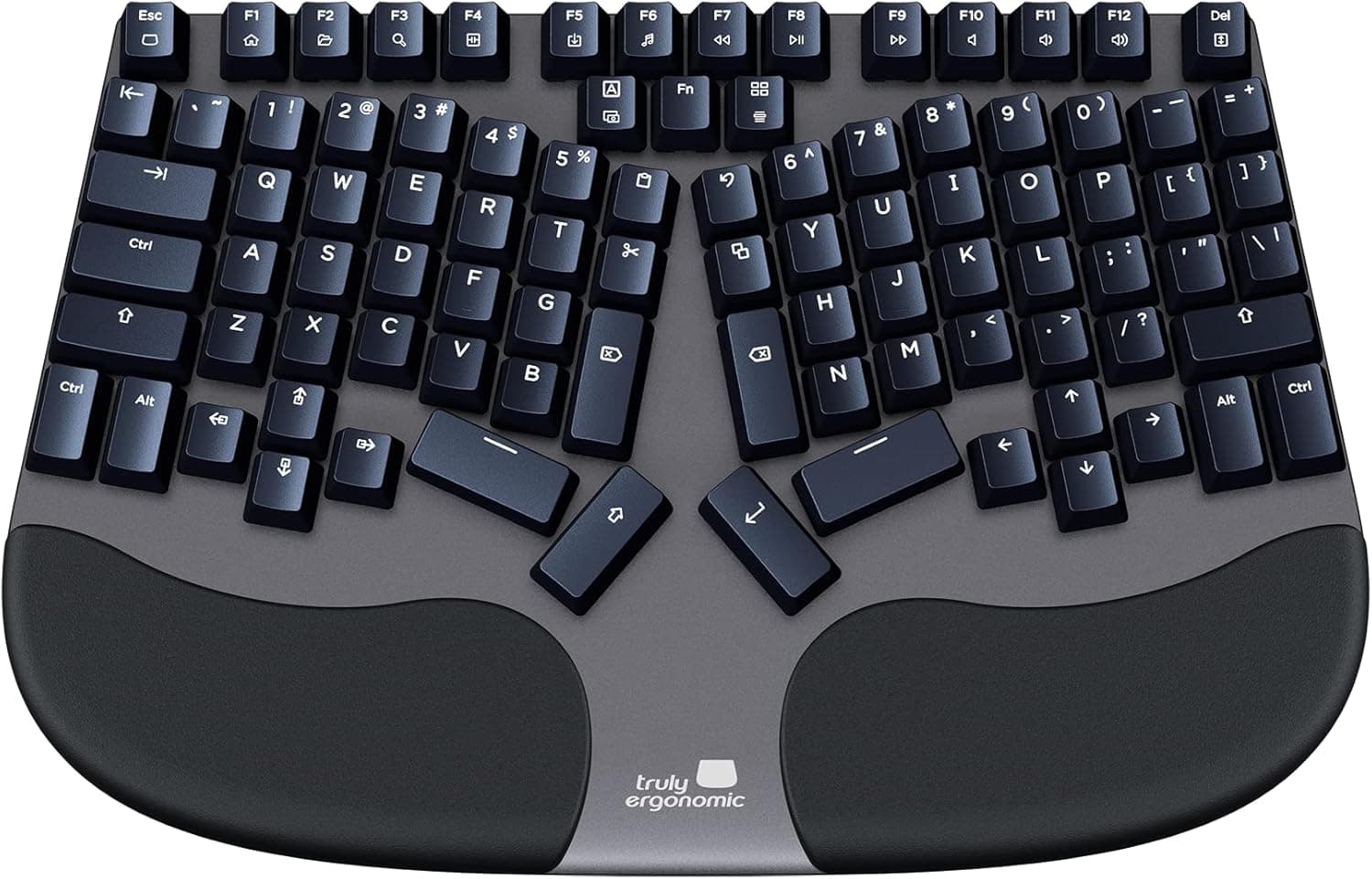
The Cleave Truly Ergonomic is a split mechanical board with tactile optical switches, built for people seeking a radical ergonomic change.
Price range: See on Amazon
What we liked
- + Split design aims to keep hands at a natural width and angle
- + Tactile optical switches offer feedback with a contactless actuation design
- + Distinct ergonomic layout targets people with wrist discomfort from standard boards
Trade-offs
- - Unusual key arrangement brings a long adaptation period
- - Optical switches limit swapping to compatible optical types only
Fit for the job
The Cleave targets people who have already found standard or even mildly split ergonomic keyboards insufficient for wrist, hand, or shoulder discomfort, since its layout is a more dramatic departure from a normal keyboard than most split boards on the market. Independent reviews describe a columnar key arrangement split into two distinct halves with dedicated thumb clusters, a design meant to keep hands at a more natural angle and width than a traditional row-staggered keyboard. This is not a board for someone who wants a split layout without changing their typing habits much, since reviewers consistently note a real adjustment period before typing speed returns to normal, and it comes with a 60-day money-back window from the manufacturer for buyers who find the adjustment too difficult.
Features and specs
The Cleave uses optical switches throughout rather than traditional mechanical MX-style switches, with retail units built around Outemu optical switches according to independent reviews, and this specific tactile listing corresponds to the tactile optical variant among the brand's red linear, brown tactile, and blue clicky optical options. Optical switches actuate by interrupting an infrared light beam rather than closing a physical electrical contact, a design that independent testing describes as reliable and largely free from the key chatter that can affect aging mechanical switches. The board includes backlit keys and floating keycaps set into an exposed aluminum alloy body, and it connects across Windows, Mac, and Linux according to the product listing.
Build and materials
Reviewers highlight the exposed aluminum alloy body as a durable, premium-feeling build compared to plastic-cased keyboards, giving the Cleave a sturdier feel on the desk than many split ergonomic boards in its category. One consistent criticism across independent reviews is the stabilizers, which are plate-mounted and ship unlubed, resulting in a stabilizer feel that trails behind better-tuned boards even though the switches themselves perform well. The cushioned palm rest, called out in the listing and echoed in reviews, adds comfort during long sessions, which matters given how central wrist positioning is to this board's entire design purpose.
Value for the price
The Cleave sits at a premium price point reflecting its specialized ergonomic design and small-batch manufacturing rather than mass production, and buyers should expect to pay well above typical mechanical keyboard prices for the columnar split layout and optical switch platform. The 60-day return window some retailers note is a meaningful value cushion given how significant the learning curve is, letting buyers test whether the layout actually helps their discomfort before being locked into the purchase. For anyone who has tried and rejected less extreme ergonomic keyboards, the price is easier to justify than for someone testing ergonomic keyboards for the first time.
How it compares
In mechkeeblab's split ergonomic keyboard guide the Cleave ranks toward the lower half of the field, behind higher-scoring wireless options like the Keychron Q11 Ultra and the Kinesis Advantage360, both of which add wireless connectivity and more mainstream mechanical switch platforms that are easier to source replacements for. The Cleave's key disadvantage against those rivals is switch sourcing, since independent reviews note that replacement optical switches are difficult to find and the company does not sell switch packs directly, a real long-term concern for a board this specialized and this expensive.
Frequently asked questions
How steep is the learning curve on the Cleave?
Independent reviews describe a genuine adjustment period due to the columnar, split key layout, though typing speed is expected to recover with enough practice.
What type of switches does it use?
It uses optical switches, specifically Outemu tactile optical switches on this listing, which actuate by interrupting an infrared beam rather than a physical contact.
Can the switches be replaced if one fails?
Replacement optical switches are hard to find outside specialty sources, and the manufacturer does not sell switch packages directly, according to independent reviews.
Does it work on Mac and Linux, not just Windows?
Yes, the listing states compatibility across Windows, Mac, and Linux.
Prices change often, so check the current price and availability on Amazon.
Check price on AmazonMechKeeb Lab may earn a commission from the link above.