MageGee MK-Box Portable 60% Mechanical Gaming Keyboard, LED Backlit, 68 Keys, Blue Switch, Grey/Black Review (2026)
Updated September 14, 2026 · Research-based review
Our verdict
The MageGee MK-Box is a cheap, portable way to try mechanical blue switches without spending much money, and its compact 68 key layout with arrows fits small desks and dorm rooms well. Build quality and the basic LED backlight show the budget price, and the switches are soldered rather than hot swappable.
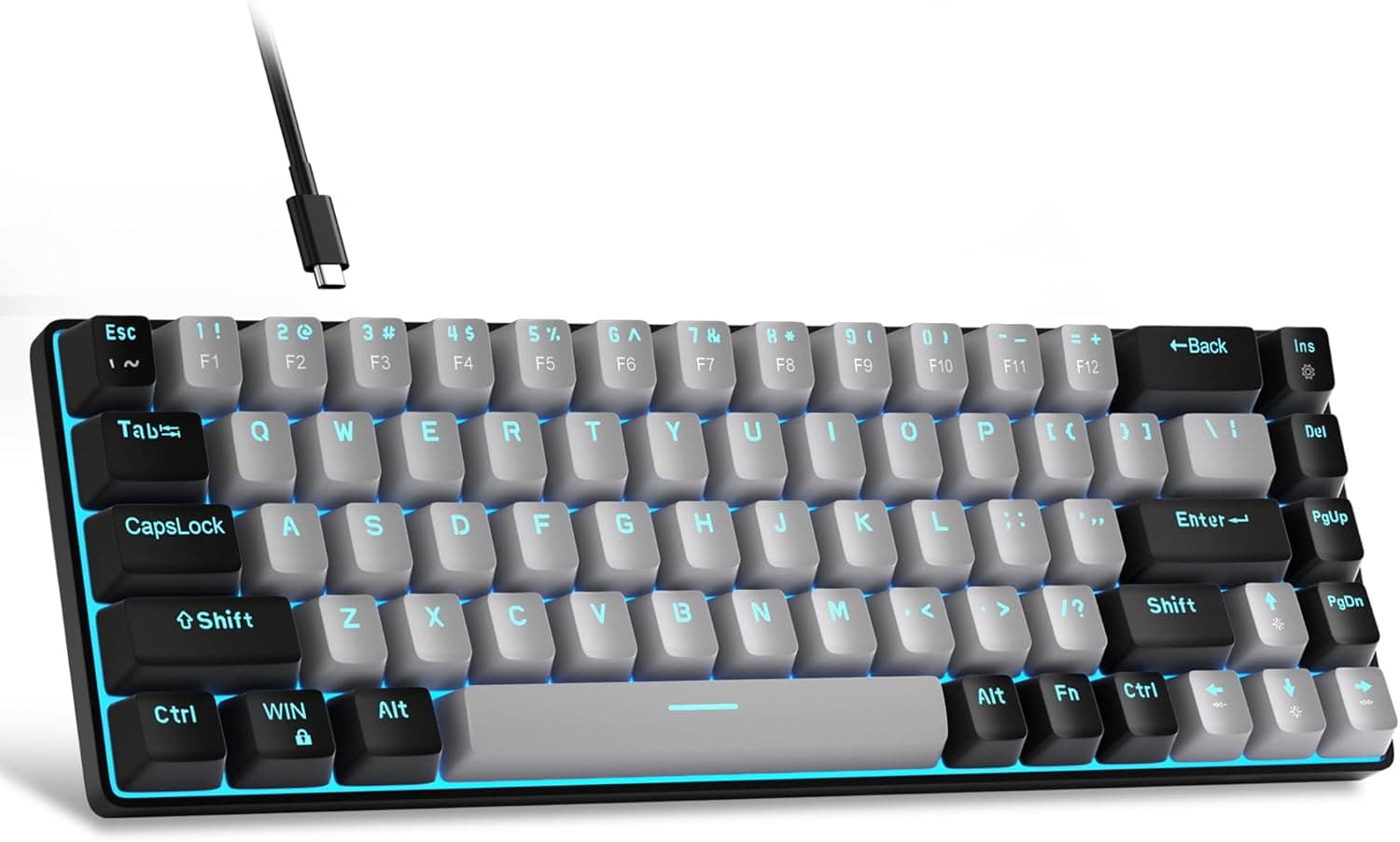
MageGee's MK-Box is a portable grey and black 68-key compact board with LED backlight and blue switches at a very low price.
Price range: See on Amazon
What we liked
- + Very low price makes it an easy way to try mechanical switches
- + Compact portable body with arrows is handy for small desks and dorms
- + Blue switches give clear clicky feedback for new mechanical users
Trade-offs
- - LED backlight is basic and not full RGB despite the gaming branding
- - Loud blue switches and light plastic build show its budget roots
Who this compact board is aimed at
The MK-Box is built for anyone who wants a low cost, portable introduction to mechanical keyboards, whether that is a student in a dorm, someone setting up a second desk, or a gamer who wants a small board to travel with. The 60 percent compact layout with 68 keys keeps a dedicated arrow cluster, which many true 60 percent boards drop, making it more usable for everyday typing and light spreadsheet work than boards that force you to hold a function layer for arrows. Its light weight and detachable USB cable also make it easy to toss in a bag, unlike full size boards that are awkward to carry around.
What the blue switches and build feel like
The blue switches here are clicky and tactile, giving a distinct audible click and a clear bump when a key actuates, which helps new mechanical keyboard users learn to type without bottoming out every key. That same loud click means the board is a poor fit for shared offices, thin walled apartments or video calls where a microphone might pick up the noise. The keyboard uses a white LED backlight with roughly 15 lighting modes and adjustable brightness and speed, controlled through function key shortcuts rather than software, which keeps things simple but limited compared with full RGB boards. All 68 keys support anti-ghosting for reliable input during fast typing or gaming.
Living with the MK-Box day to day
Setup is plug and play over the detachable USB cable, with no drivers needed on Windows, Mac or Linux. Two kickstand feet let you adjust the typing angle, and the double color injection keycaps keep legends visible as the plastic wears. One important limitation: the switches are soldered to the board rather than hot swappable, so if a switch fails or you want to try a different feel later, that requires desoldering rather than simply pulling a switch out. At roughly 570 grams and a compact footprint, the board is light enough to move around a small apartment or take on a trip without much thought.
How it compares with other budget boards
Against the Redragon K552, a similarly priced compact board, the MK-Box trades the K552's metal top frame and 87 key tenkeyless layout for an even smaller 68 key footprint and a lighter plastic build, which suits tighter desks but feels less substantial in hand. Within MageGee's own lineup, the red switch version of the MK-Box offers a quieter linear feel for the same price, which is worth considering if office noise is a concern. Compared with entry boards from Keychron or Royal Kludge, the MK-Box undercuts them on price but drops wireless connectivity and hot swap sockets entirely, making it a pure budget pick rather than a long term platform.
Verdict and who should spend a bit more
Buy the MK-Box if your goal is the cheapest reasonable way to find out whether you like mechanical keyboards, or you specifically need a small, light board with arrow keys for a cramped desk. It delivers on that narrow job well. Spend more if you want hot swap flexibility to experiment with switch feel later, since this board locks you into whichever switch you buy, or if you work in a shared space where loud blue clicks would bother other people, in which case the red switch version or a quieter linear board elsewhere would serve you better.
Frequently asked questions
Are the switches on the MageGee MK-Box hot swappable?
No, the switches are soldered directly to the board, so changing switch types later requires desoldering rather than simply pulling the switch out.
How loud are the blue switches on this keyboard?
Blue switches are clicky and produce a distinct audible click on every keystroke, which makes this board better suited to a private room than a shared office.
Does the MK-Box need drivers or software to work?
No, it is plug and play over USB on Windows, Mac and Linux, and backlight modes are adjusted with function key shortcuts rather than an app.
Does the layout include a numpad?
No, it uses a 68 key 60 percent layout that keeps a dedicated arrow cluster but drops the numpad and most navigation keys to stay compact and portable.
Prices change often, so check the current price and availability on Amazon.
Check price on AmazonMechKeeb Lab may earn a commission from the link above.